
F-04Faculty
3 min read
Controlling Live Submission Windows & Emergency Extensions
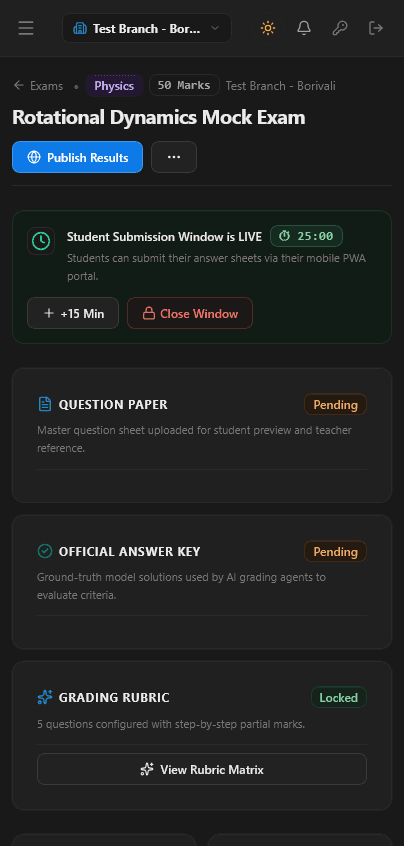
Opening live submission windows, monitoring submission counters in real time, giving +15 min extensions, and closing windows.
Students can only submit answer sheets during an active window opened by faculty. You retain real-time control over time limits and extensions.
1Open the Submission Window
When students are seated and ready, go to the exam page and click [ + Open Window ]. Set the window duration in minutes (e.g. 60 minutes) and click Confirm. Student phones immediately show the active exam card.
Click / Verify:+ Open Window
2Monitor Submissions Live
Watch the live counter on your screen: 'Submitted: X / Total: Y'. The list updates automatically as students submit their papers.
3Grant Emergency Extra Time (+15 Min)
If students need extra time to finish scanning their pages, click [ +15 Min ]. The window extends immediately for all unsubmitted students across the batch.
Click / Verify:+15 Min
Click to zoom
Tip
You can click [+15 Min] multiple times if needed. Every extension is recorded in the operational audit log.
4Close the Window
When the exam ends, click [ Close Window ]. Submissions lock immediately, preventing any late uploads.
Click / Verify:Close Window