
Setting Up AI Rubrics & Optional Choice Questions (Best-of-N)
Generating step-marking rubrics from answer keys, setting up optional choice rules, and approving rubrics.
1Generate Rubric from Key
On your exam page, click [ Generate Rubric with AI ]. The system analyzes your Question Paper and Answer Key, identifies all questions, and drafts step-by-step marking criteria (e.g., +1 for Formula, +1 for Substitution, +1 for Final Answer with Units).
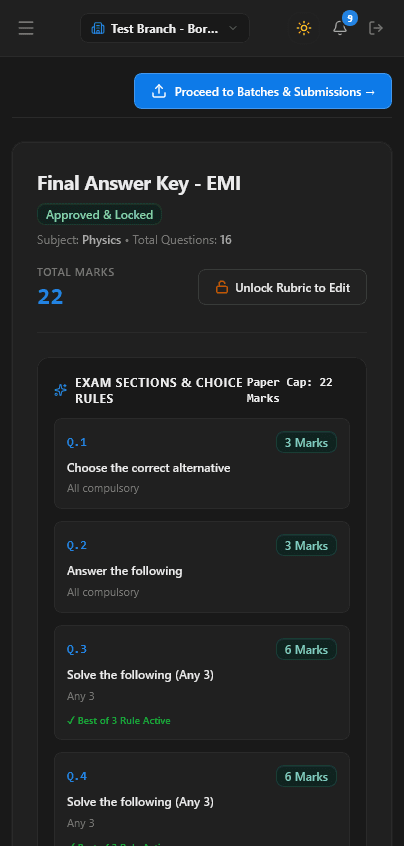
2Configure Optional Choice Questions (Best-of-N)
If your exam contains choice sections (for example: 'Answer any 3 out of 5 questions in Section B'), click [ Add Choice Rule ]. Select the eligible question numbers (e.g., Q5, Q6, Q7, Q8, Q9) and set the rule to 'Best 3 of 5'. The evaluation engine will automatically award marks to the 3 highest-scoring answers.
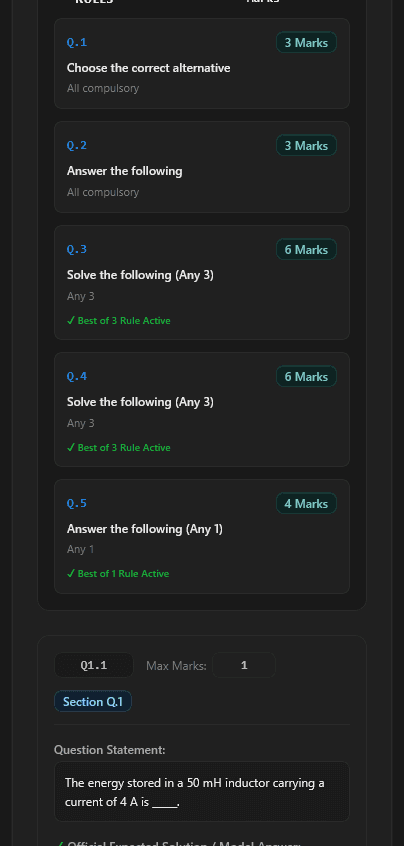
3Review & Approve the Rubric
Check the criteria for each question. Use the [+] and [-] steppers to adjust marks if needed. Once satisfied, click [ Approve Rubric ]. The exam status turns green: 'Rubric Approved'.